Adding Widgets, Add-Ons & tools to your blog is not just a lot of fun for your blog readers, but can also be very useful and help you to create a community for your blog or even a loyal reader base.
Here's a collection of best and most useful blog widgets or add-ons that can be easily integrated with any website/blog. All these below add-ons are 100% Free and they are very easy to install.
Outbrain Star Ratings Widget: Very eager to know what your readers think about your posts?
Here is a cool star rating widget by Outbrain. The insttallation is very simple,
just follow the step by step instructions on their site.
ShareThis or AddThis : Sharethis or Addthis social bookmarking  buttons makes it easy for your visitors to share your content with others. It is a good way to increase your link popularity and publicity. Their nice css dropdown icons reduces the clutter on your pages and eliminates the need to add a different button for each social bookmarking service.
whos.amung.us : This is a real time visitor tracking widget and displays 
the number of people currently on your site and what pages they are
reading. You don't need any sign-up's to grab this widget.
Web2PDF Online : With this widget installed, your visitors can easily download
your articles in PDF format with just a click. The downloaded PDF's are
free of any advertising and you can get full access to download stats,etc.
ZOHO Creator: With Zoho Creator, you can create professional online
contact forms/web forums in minutes. The good things about this is
there are no data limits and readers can also upload attachments while
submitting the form.
Google Talk Badge: Google Talk Badge will let your visitors to
chat with you.The badge will active whenever you sign in to
Googletalk. The nice thing is your visitors can chat with you even
if they don't have a google account.
Yahoo Media Player: With this very useful widget, you can easily add a simple media player to your blog which can auto detect mp3 links and create an embedded player. This tool is very useful for especially audio,music blogs.

Cbox: Cbox or Chatbox is a chat widget which can be easily embedded
in any web page. It is free and have many features including message
history, spam blocking,etc. It can be easily customizable to fit your
blog layout.
Google Translate: This widget lets your non-English speaking
visitors to quickly translate your webpage in their native
language with just a single click.
Spiga
Useful Widgets,Add-Ons & Tools for Your Blog,Website

How to add a PAYPAL DONATE button to your blogger(blogsot) blog
This post explains how to add a Paypal donate button to your blogger(blogspot) blog:-
Adding a Paypal donation button to your blog will give your loyal readers a chance to support(encourage) you by donating a few bucks.
If you don't have a paypal account yet,.. you can get a Free Paypal account here.
so,let's see how to put a Paypal donation button in your blog...
1.First,Log in to your Paypal account.

2.Click on the 'Merchant Services' tab (see at the top of the page).

3.Scroll down the window and you will see an option "Donations" in the right sidebar.Click on it!

4.Now,you will see some options like Donation name/service ,donation id,etc etc...
The first field (Donation name/service) is the only thing that is required and all the remaining fields are optional.
Enter that first field,choose a button style,scroll down the window and click on "Create a button Now"

5.Now,you will see some html code... Copy it and sign in to your blogger dashboard »» Click on the layout »» Add a Page element »» html/javascript »» and paste that html code and SAVE THE CHANGES.
Here is how the button will look in your sidebar
How To Add Twitter to your Sidebar
I encourage twittering! It’s fun, and its good marketing for your blog! Sign up at Twitter.com. Fo’sure your first order of business will be to follow me! @naumanx2, and then ya know.
You might even be able to ask questions there, since ya know, we do it! (unlike the posting around here!) Sorry ’bout the posting bit… I got a little carried away. But no worries. I’m carried right back.
1. Sign up for twitter
2. Upload this great plugin: Twitter Tools, and then you can put your tweets in the sidebar of your blog.
3. For Firefox, use TwitterFox addon to add or read tweets from the status bar of your browser. (If you use Internet Explorer, you really should take my advice and go here.)
4. Then go find a pretty icon like these: Twitter Icons, and upload it to Photobucket.
5. To put in your sidebar, copy and paste this code to a Text Widget (Found under “Appearance” in the 2.7 version):

Replace the red text with your twitter name, and the green text with the direct link of that twitter image you put in photobucket. If you want your image to line up next to another item, insert this
float:left;in the style quotation marks (in blue).
Any problems? Leave a comment and I’ll answer them. Happy tweeting!
How to Check whether your Blog is Accessible in Other Parts of the World?
 It’s relatively quite impossible to pester your entire network of friends around the world to check whether your blog or website is accessible in their countries or not on a frequent basis. For several reasons such as server errors, blocked in certain parts of the countries like China or India for sensitive content, your blog would not be accessible. Hence, this would result in a loss of potential readers and subscribers. Unless they inform you that your site is down in their locations, you wouldn’t be able to know that by yourself.
If you’re a blogger or webmaster, this when a simple but useful service comes in really handy. Called “Just Ping“, it’s an online web-based Ping that remote ping a server or web site using our network with 37 checkpoints worldwide to help you check whether the site is accessible or not. Simply punch in your website URL or IP a ddress into the textfield provided and hit “ping!”.
It’ll take a while for the result to be loaded and if you’re site is either blocked or inaccessible, the service would state the percentage of the packet of the website is loss is a particular location under the “Results” column. This information is useful as you can contact the folks at your hosting provider regarding the issue. If they said there are no problems with their server, then it got to be your website being blocked by the government in that location. Besides showing your the result of the ping, it even provides you valuable information such as minimum, average and maximum rrt.
Although this tool has been on the web for quite a while, but at least it’s pretty useful for bloggers, webmaster or developers to check their websites in different locations worldwide to make sure that it works fine.
Blogger Adsense Converter (desktop-based)
By default, when you insert any javascript code into Blogger’s HTML editor, you will get the following code: “Your template could not be parsed as it is not well-formed. Please make sure all XML elements are closed properly. XML error message: The content of elements must consist of well-formed character data or markup.“.
Since the popular eblogtemplates’ Ad Code Converter doesn’t work for me (not sure why), I stumbled across a desktop application developed by D4rkSoft and was pretty impressed by the simple converter. Simply copy and paste the ad code or if you already have a file in your computer, upload it and click “Convert”. Press “Select and Copy Code” and paste it into your HTML editor.
The original file was in .rar format, so I’ve already help you decompress the file to save time. Here’s the link…
Download Blogger Adsense Converter (desktop-based)

Free Instant Blog Logos

The motto posted on their website is,”You don’t have to spend big bucks anymore for designer, because this service is 100% free”. That’s something most of you can appreciate I’m sure!
For those of you who don’t know how to use Adobe Photoshop (or own it for that matter) then you can either download a free photo editor like Paint.net or Gimp (my personal favorite) to modify the logos. You’ll have to download, install, and spend a few hours getting ramped up before you’d be able to cusomize the logos. It’s not a quick easy thing to do but if you’ve got the time and are ready to learn a new useful skill, then it’s worth doing.
Google Blogger For Dummies®

Blogging For Fun Or Profit!

Why Most Bloggers Are Stuck - Reporters vs Experts
There are basically two types of bloggers in the world - reporters and experts - and some people perform both roles (usually the experts, it’s hard for reporters to become experts, but it’s easy for experts to report).
If you have ever taken an Internet marketing course or attended a seminar specifically for beginners, you have probably heard about the two different methodologies. Whenever the business model is based on content, and if you blog for money then the model is based on content, people are taught to either start as reporters, or if possible step up as experts.
I’ll be frank - you want to be the expert.
Reporters leverage the content of the experts and in most cases people start off as reporters because they haven’t established expertise. Experts enjoy the perks of preeminence, higher conversion rates because of perceived value, it’s easier to get publicity, people are more likely to seek you out rather than you having to seek others out, joint ventures come easier, etc… experts in most cases simply make more money and attract more attention.
Most Bloggers Are Reporters
The thing with expertise is that it requires something - experience. No person becomes an expert without doing things and learning. Bloggers usually start out without expertise and as a result begin their blogging journey by talking about everything going on in their niche (reporting) and by interviewing and talking about other experts (reporting again).
There’s nothing wrong with reporting of course and for many people it’s a necessity at first until you build up some expertise. Unfortunately the ratios are pretty skewed when it comes to reporters and experts - there are a lot more reporters than there are experts, hence reporters tend to struggle to gain attention and when they do, they often just enhance the reputation of the expert they are reporting on.
Don’t Replicate Your Teacher
If you have ever spent some time browsing products in the learn Internet marketing niche you will notice a pattern. Many people first study Internet marketing from a “guru” (for lack of a better term). The guru teaches how he or she is able to make money online, and very often the view that the student gleams is that in order to make money online you have to teach others how to make money online.
The end result of this process is a huge army of amateurs attempting to replicate what their teacher does in the same industry - the Internet marketing industry - not realizing that without expert status based on a proven record and all the perks that come with it, it’s next to impossible to succeed.
Even people, who enjoy marginal success, say for example growing an email list of 1,000 people, then go out and launch a product about how to grow an email list of 1,000 people. Now I have no problems with that, I think it’s fine to teach beginners and leverage whatever achievements you have, the problem is that people gravitate to the same niche - Internet marketing - and rarely have any key points of differentiation.
How many products out there do you know of that all claim to teach the same things - email marketing, SEO, pay per click, affiliate marketing, and all the sub-niches that fall under the category of Internet marketing. It’s a saturated market, yet when you see your teachers and other gurus making money teaching others how to make money (and let’s face it - making money as a subject is one of the most compelling) - your natural inclination is to follow in their footsteps.
If the key is to become an expert and you haven’t spent the last 5-10 years making money online, I suggest you look for another niche to establish expertise in.
Report on Your Process, Not Others
The secret to progress from reporter to expert is not to focus on other experts and instead report on your own journey. When you are learning how to do something and implementing things day by day, or studying other people’s work, you need to take your process and what you do as a result of what you learn, and use it as content for your blog.
It’s okay to talk about experts when you learn something from them, but always relate it to what you are doing. If you learn a technique from an expert it’s fine to state you learned it from them (and affiliate link to their product too!) but you should then take that technique, apply it to what you are doing and then report back YOUR results, not there’s. Frame things using your opinion - your stories - and don’t regurgitate what the expert said. The key is differentiation and personality, not replication.
Expertise comes from doing things most people don’t do and then talking about it. If you do this often enough you wake up one day as an expert, possibly without even realizing how it happened, simply because you were so good at reporting what you did.
You Are Already An Expert
Most people fail to become experts (or perceived as experts) because they don’t leverage what they already know. Every person who lives a life learns things as they go, takes action every day and knows something about something. The reason why they never become an expert is because they choose not to (which is fine for some, not everyone wants to be an expert), but if your goal is to blog your way to expertise and leave the world of reporting behind you have to start teaching and doing so by leveraging real experience.
Experience can come from what you do today and what you have done previously; you just need to take enough steps to demonstrate what you already know and what you are presently learning along your journey. I know so many people in my life, who are experts simply by virtue of the life they have lived, yet they are so insecure about what they know, they never commit their knowledge to words for fear of…well fear.
Blogs and the Web in general, are amazing resources when you leverage them as a communication tool to spread your expertise because of the sheer scope of people they can reach. If all you ever do is talk to people in person and share your experience using limited communication mediums, you haven’t much hope of becoming an expert. Take what you know and show other people through blogging, and you might be surprised how people change their perception of you in time.
Reporting Is A Stepping Stone
If your previous experience and expertise is from an area you want to leave behind or you are starting from “scratch”, then reporting is the path you must walk, at least for the short term.
Reporting is a lot of fun. Interviewing experts, talking about what other people are doing and just being part of a community is not a bad way to blog. In many cases people make a career of reporting (journalism is about just that), but if you truly want success and exponential results, at some point you will have to stand up and proclaim yourself as someone unusually good at something and then proceed to demonstrate it over and over again.
Have patience and focus on what you do to learn and then translate that experience into lessons for others, and remember, it’s okay to be a big fish in a small pond, that’s all most experts really are.
Get Paid to Write Reviews on Your Blog


There are several relatively easy ways to make some money from your blog such as using Google AdSense, selling private ad spots, and writing reviews. The downside with using Google AdSense and trying to sell private ad spots is your blog must have enough traffic to generate the clicks or page impressions. My guess is most of you aren’t getting hundreds of visitors to your blog each day (not yet at least) so you aren’t making much money from those methods of advertising.
How does writing reviews make me money?
It’s actually easier than you think. The first step is to sign up with a blog review network and submit your blog. Some of these companies have rules in place like the age of your blog (at least 6 months old, etc), where it’s hosted (blogspot, wordpress, etc), and page rank. They try to weed out spam blog sites which are usually not very old or of good quality. Make sure you read the fine print before you spend your time applying only to find out you don’t qualify.Assuming your blog is approved, you can now browse the review marketplace looking for reviews to write about or another option is to wait for someone to approach you. I recommend you be the aggressor and sift through the marketplace so you can start making money asap.
Once you find a review you’d like to write about and meet the criteria to qualify, just take it and begin. You’ll create your blog post and follow the requirements of the reviewer, then submit it for approval. After it’s approved, you get paid. Pretty easy huh?
What blog review networks do you recommend?
There are several companies out there who pay you to write reviews on your blog but only two of them are worth talking about in my opinion. They are Sponsored Reviews and Pay Per Post.
Sponsored Reviews is great because they allow you to search for advertisers directly and bid on jobs. Their bidding system allows you to negotiate rates with advertisers in order to maximize your earnings. They also provide the largest payout of all review networks by only taking a 35% commission for their services. That means you can earn anything from $10 to 500+ for each review. Their user interface is one of the better ones out there and the only drawback to their service is the lack of advertisers. I’m sure it will continue to grow it’s advertising base so they are at least worth a look.
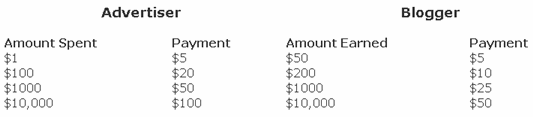
One other perk is their affiliate program. Earn up to $175 per Advertiser and $90 Per Blogger referred. Payouts are based on money spent by the advertiser and money earned by the blogger. See the chart below for payouts. Their average advertiser spends several hundred dollars so most referrals will be worth at least $25 (according to their website).

Next up we have PayPerPost which is another great pay for review site. They offer the largest sponsored blogging network with the greatest amount of offers along with a forum where bloggers can post questions, etc. They also pay you a $20 bonus after you complete your first review post. The review post is easy…you just need to write about PayPerPost and they give you $20. Pretty quick way to make a quick $20.
One bad thing I noticed while browsing their marketplace is the restrictions on a few of the reviews. For example, you couldn’t write a review and post it on blogspot.com, wordpress.com, or myspace.com and you must be located in North America, Asia, or Europe only. That doesn’t mean if you have a blogger blog or wordpress blog using your own domain or hosted on your own site you can’t write a review. All I’m saying is make sure you read the review details carefully so you don’t waste your time writing a post only to discover you won’t get credit for it.
They also have a scoring system which might be a barrier to you on some post reviews. It’s usually the higher payouts that are looking for nice reviews from established high ranking sites. They utilize Google Page Rank and Amazon’s Alexa rankings to factor in what your site’s “score” will be.
PayPerPost also offers a referral affiliate program with some pretty nice payouts as well. You will get paid $15 for each referral once the referees first blog posting is reviewed, approved and then finally accepted 30 days later. This means they need to go all the way through the process in order for it to be a legit referral. Again, not a bad payout for just putting a banner or link on your blog. It’s cool because you can see which referrals you currently have signed up and the total amount you potentially could earn (assuming they convert all the way mentioned above).
Summary
If I were you, I’d sign up for both Sponsored Reviews and PayPerPost and see which one works best for you. There is no rule preventing you from having two accounts and writing reviews from both sites and you can promote whichever you choose. That’s what I did and it also gives you a bigger selection of available reviews to write. After you sign up, make sure you get some affiliate banners on your blog so you have another avenue to make money. Just imagine if you write a dozen or so reviews a month and get a couple referrals. You could easily earn a few hundred extra bucks a month for some pretty minimal work!I wish these sort of sites were available when I was in college because I had tons of free time and needed to make money. I could have easily earned $500+ a month writing a couple reviews a day!
How to add META tags into your blog?
While there are lots of factors involved in building quality blogs that can draw huge traffic in, having simple things right in the beginning is as important. One of this simple thing is getting your blog indexed properly with the right description & keywords to optimize search engine rankings (known as Search Engine Optimization or SEO).
To get information, search engines use automated Software Agents called spiders, crawlers, robots, or bots to collect the a few words from a site or blog (typically the URLs, blog name, and blog description, and maybe some words in the early part of sentences or paragraphs) that will later be used as keywords to index the blog.
Because you cannot be certain which words are taken as keywords pertaining to your blog, it's most likely that your blog won't be indexed properly in search engines - in the worst case, your highly relevant keywords might not even be used to index your blog. When this happen, searches on keywords relevant to your blog may have your blog buried at the far end of the list of thousands and millions of pages. What a waste!
To have a control of what is read by crawlers on your blog to be indexed, you have to build what is called a META tag - basically a bunch of words that makes up the most relevant description and keywords of your blog. If the META tag exist, this is what the crawlers will read and index and get displayed on any searches related to your keywords.
Here's what a search on my blog looks like on Google. The description is exactly the one I have written in the META tag. The 1st search on the list shows the new META tag description that was made a few seconds before the snap. The old META tag is shown beneath it (22 hours ago).

There are basically 2 parts to a META tag: first is the META description and second is the META keywords. The description are what appears on a search. As you can see, if the description is too long, it'll be cropped as search engines only uses a few lines to describe the blog. An optimum number of characters to use for META description is 150 (including spaces and dots).
For META keywords, you can use as many words as you want, but don't repeat the same word too many times (more than 5) to avoid keyword spam. Crawlers can identify keyword spamming easily - which won't make it good either for SEO.
To create a META tag, simply copy the code below and rewrite your META description and keywords (the red text):

Go to this Free META Tag Builder tool. It directs you easily to build a META tag, create the HTML or XHTML code, and guides to paste it into your blog template XML code.
Just for the fun of it, you can analyze your blog's original description and keywords by submitting your blog URL at the Free META TAG Analyzer before placing the new META tags in your blog - so that you can compare how it is indexed before and after the change.
Search
Subscribe


Our Partners






Sponsered